ThePipelayer's Bible Call(909) 435-5250

The Pipelayer's Bible

Field to office, seamlessly

A phone app built for underground pipe crews. It works with no signal and puts the day's work in front of the foreman and the office without anyone retyping it.

30 days free for your company and 6 people. No credit card.

Company Home in the app for an example company: 4 active runs and 1 active permit live now, 5 daily reports signed today, 3 delays and extra work, and 5 jobs underway starting with Main St Sewer Replacement

Why it exists

12 years of underground experience went into building this program.

Thomas Fontaine has spent 12 years in underground construction. He built The Pipelayer's Bible for the things he saw on job after job: grade worked out by hand in the trench, delays nobody wrote down until the end of the day, and a daily report typed up again at night from memory. The app keeps that work on the phone where it happens and sends it to the foreman and the office when there's signal. It's built in the field, for the field, and it keeps getting better every time a crew says what's wrong with it.

Thomas Fontaine

One app, the whole crew

What each person gets

Pipelayer

  • Calculates pipe grades from survey stake photos or manually entered survey data
  • Check shots, footage, slope and pipe info at a glance
  • Time-stamped delay log: utility conflict, inspector, weather, equipment down, material, survey/stakes, traffic control
  • Confined space permits and entry log, with a one-tap emergency call
  • Calculators for trenching, grade, materials and more
  • Built-in AI assistant for civil work questions on the job
Foreman

  • Full access to all pipelayer features
  • Sees his crew's run progress live
  • Daily reports filled in automatically from the day's work
  • Field tickets with photo upload
  • Warnings when an 811 ticket is nearly expired
  • Extra work documentation
  • Built-in AI assistant for civil work questions on the job
Office

  • Material takeoffs from your plan sets add-on
  • A PDF of every run, time-stamped at every point
  • A sealed original of each run PDF, so any later change would show
  • Signed daily reports with production from every job and every crew
  • Search and export every record
  • Built-in AI for civil work questions, crew management and your company's data

On the phone

See it in the app

These are real screens from the app, filled in with made-up demo data.

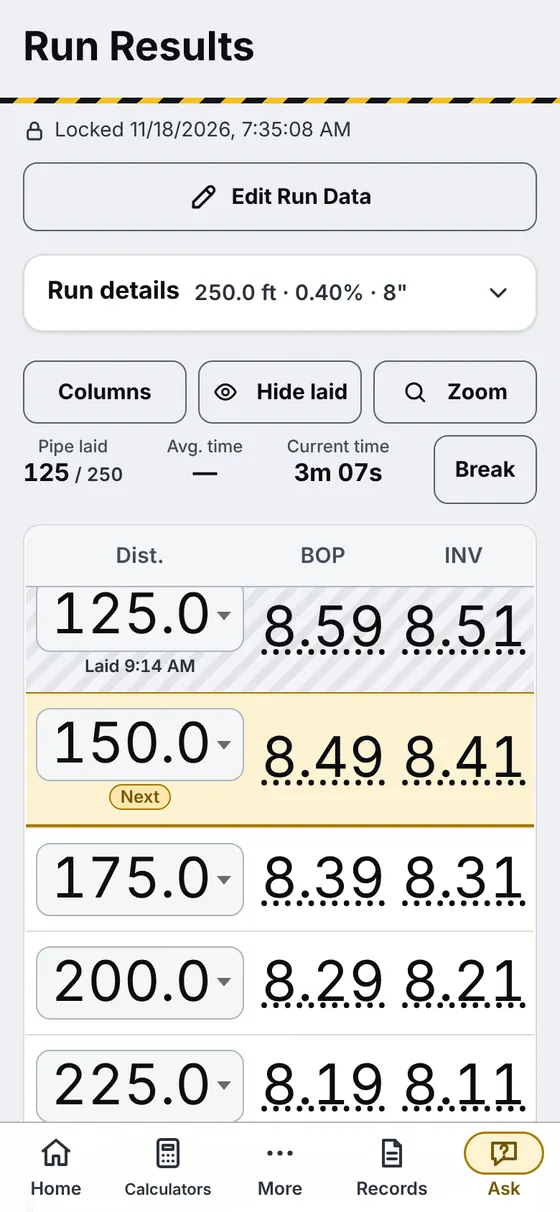
Run Results screen: a grade sheet for a 250 foot, 8 inch run at 0.40 percent, 125 feet laid, rows of distance with BOP and invert rod readings, the laid rows shaded and the next row marked
Grade sheet, mid-runLaid rows shaded, the next row marked, footage at the top.
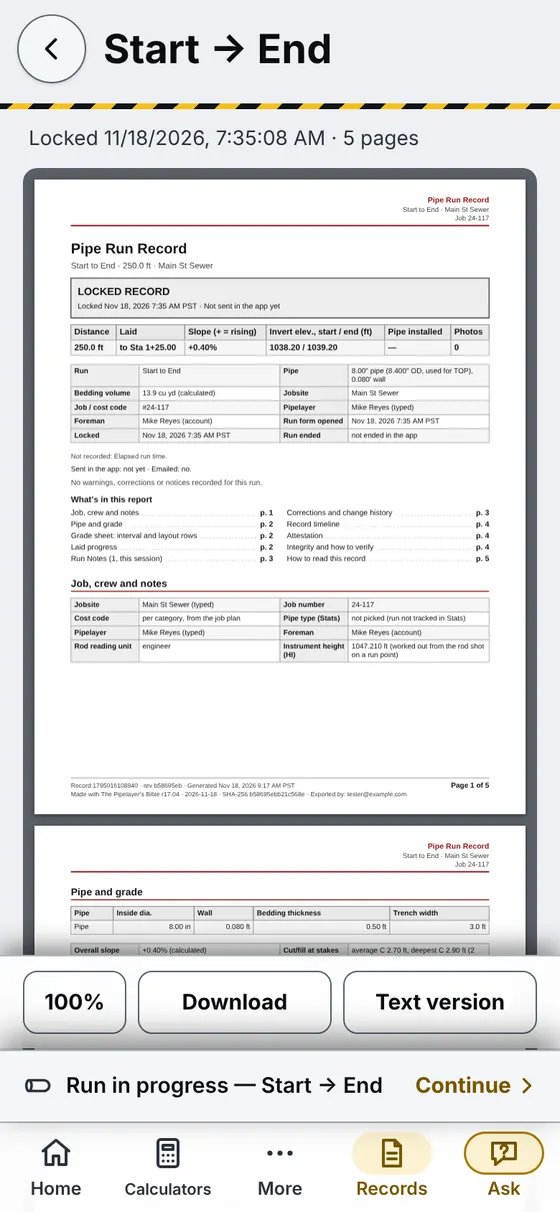
The run report PDF open on the phone: a five-page Pipe Run Record for Main St Sewer with the locked time, distance, slope and invert elevations
Run report PDFMade on the phone from the run, with the time on it.
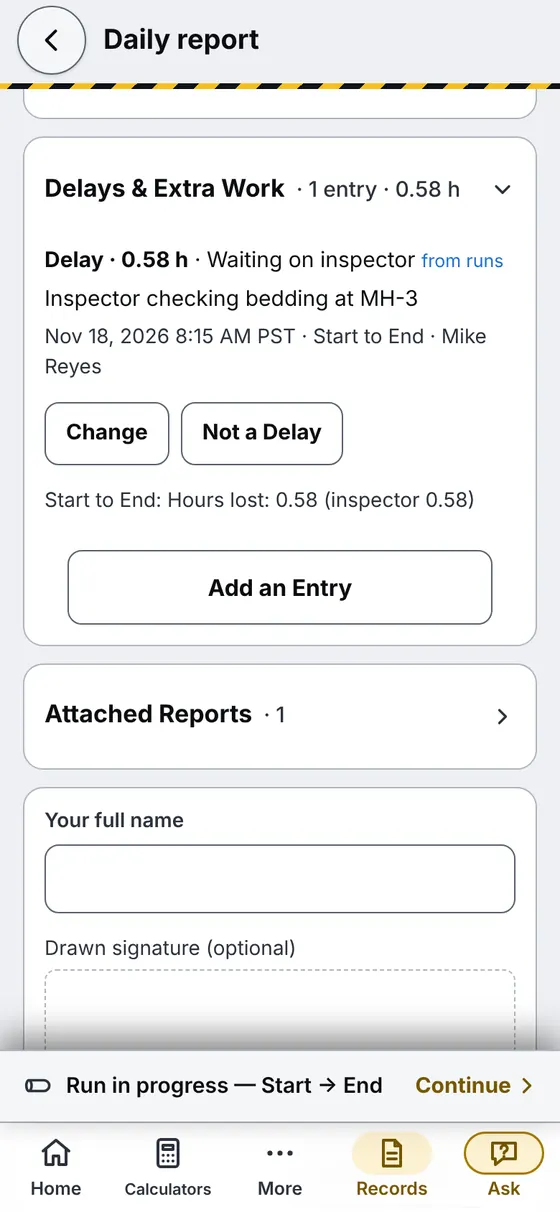
Daily report screen: the Delays and Extra Work section already shows a 0.58 hour delay, waiting on inspector, carried over from the run, ready to sign
Daily reportThe delay logged on the run is already in it.
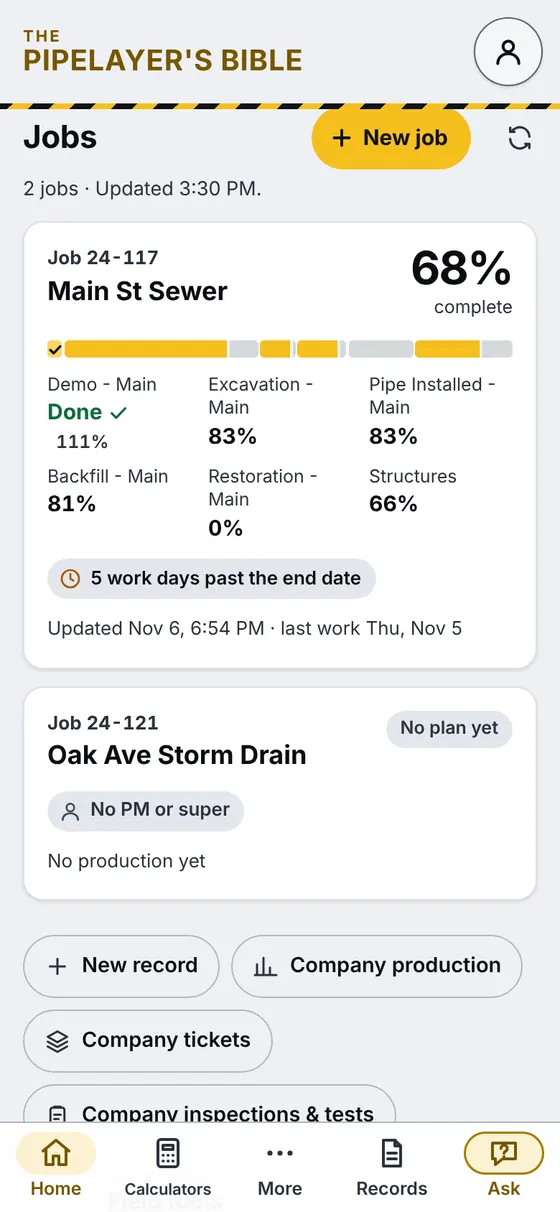
Company Home for the office: Main St Sewer at 68 percent complete with progress for demo, excavation, pipe installed, backfill, restoration and structures, and a second job with no plan yet
Office: every jobPercent complete by item, from what the crews log.

Try it on a real job

Free 30-day trial

Your company account plus 6 people. No credit card, and no automatic payment when it's over. At the end, whoever ran it gets a one-page summary of what the crew logged (footage, delays, inspections, paperwork sent) to show the owner.

  1. Send the email of whoever will run it, usually the superintendent.
  2. Thomas sets up your company the same day and sends them the invite. They add their own crew right from the app.
  3. The crew installs it from the invite and starts logging runs.
Start a free trial

Our goal is simple: get real feedback from real crews to make the best product possible. I work directly with every company that tries it, and fixes go out fast.

Thomas Fontaine

Straight answers

Questions

Does it work with no signal?

Yes. Runs, calculators and permits work with no signal. Records save on the phone and send when signal is back.

The AI features, signing in and anything shared with the office need signal, and until a record has sent, the only copy is on that phone.

What phones does it work on?

iPhone and Android. It runs in the phone's browser, and you add it to the home screen so it opens like any other app. No app store needed. The first time, open it and sign in where there's signal.

Who owns our data?

Your company. Our Terms of Use say that, between your company and us, your company owns the records your crew puts in, and your account owner controls who can see them.

You can export your records from the app while the account is open, and for at least 60 days after it closes. We don't sell your information. Details are in the Privacy Policy.

Does it replace our safety program?

No. The confined space permit form records what your crew enters. It doesn't replace your safety program, your air monitor, training or your competent person. The emergency button opens the phone's dialer to the number on the permit; someone still makes the call, and it needs signal.

Is the AI always right?

No. AI can make mistakes. It can misread a stake or give a wrong answer, so crews check every value against the stake, the plans and their own instrument before using it. On safety questions, your competent person and your site's program decide.

What happens after 30 days?

Nothing is charged automatically, and there's no card on file to charge. Thomas talks with you about keeping it. Records already sent stay in your company's account and stay readable. If you don't continue, new runs wait on each phone until the company starts a plan.

Free 30-day trial

Start a free trial

Tell us who will run it. Thomas will set up your company and get back to you.

Whoever will run the trial, usually the superintendent.
We use this only to set up your trial and contact you about it.